The Best Way to Translate a Document and Keep Formatting
The best way to translate a document isn't just about swapping words from one language to another. It's about preserving the entire document—layout, formatting, and all. Today’s approach blends smart AI-powered tools with savvy file preparation to deliver a translated PDF or Word doc that keeps its original structure perfectly intact.
Think tables, headers, images, and custom styles. Everything should look exactly as it did in the source file.
Your Quick Guide to Flawless Document Translation
We've moved far beyond the days of copying and pasting text into a basic online translator, then spending hours manually fixing the broken layout. The modern goal isn't just to get the words right; it's to create a complete, ready-to-use document in a new language in minutes.
The key is to use advanced AI services specifically designed to understand a document's structure, not just its text. For almost any business, academic, or personal project, this method offers a fantastic mix of speed, affordability, and quality.
The Modern Translation Workflow
To get consistent, high-quality results every time, it helps to think of the process in a few clear phases. This isn't complicated, but a little structure goes a long way.
This flowchart breaks down the simple, three-step process that powers modern document translation.
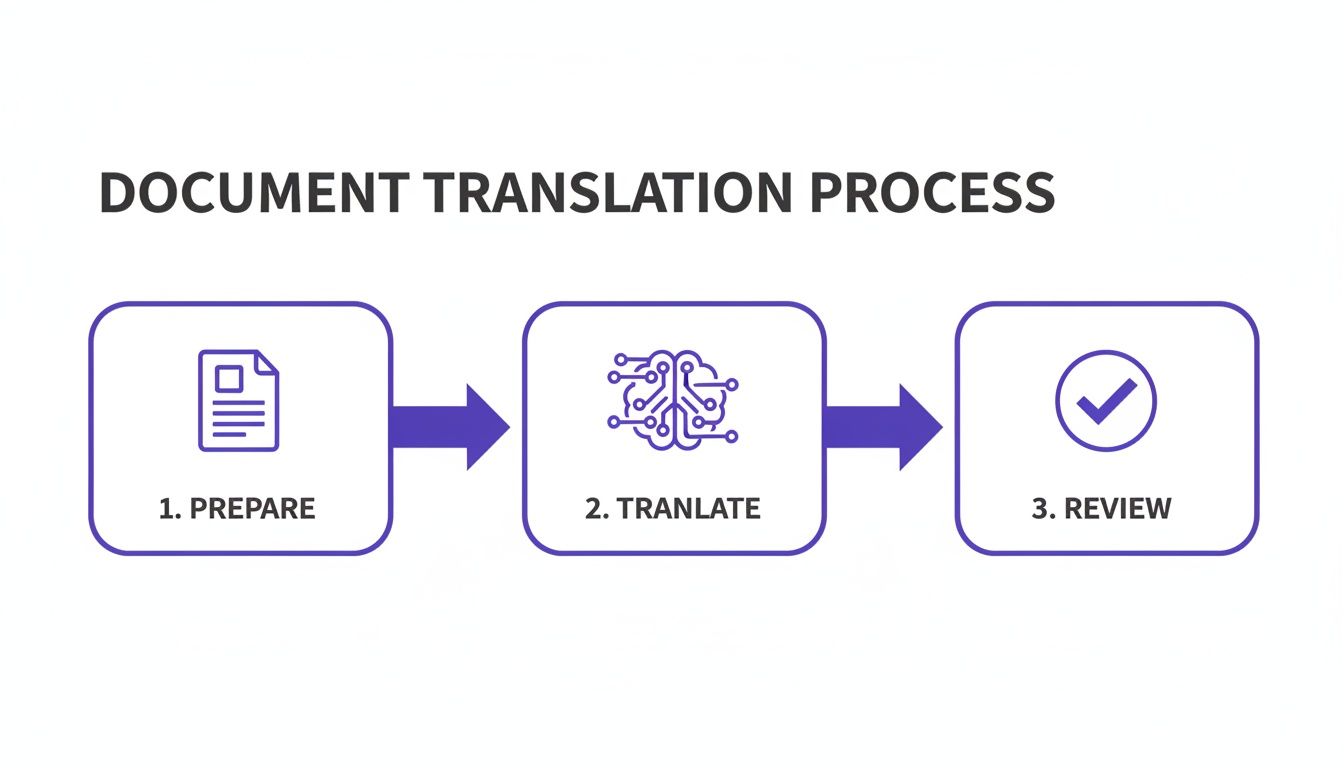
As you can see, the real magic happens when you dedicate time to preparation before translation and quality checks after.
So, why is this so important? Because a translated report with broken tables or jumbled charts is just as unprofessional as one with grammatical errors. The integrity of your document's layout is every bit as crucial as the accuracy of the words. Following this workflow ensures the final output is a perfect mirror of the original, just in a different language.
This strategy is built on a few core ideas:
- Efficiency: Automating the most tedious parts of the process frees you up to focus on what matters—the final quality review.
- Integrity: Maintaining the original formatting isn't a "nice-to-have"; it's a fundamental requirement for any professional translation.
- Accuracy: Starting with top-tier AI models means the linguistic quality is already high, giving you a massive head start.
The core idea is simple: a great translation should look and feel exactly like the original. By focusing on layout preservation from the very beginning, you eliminate the most common point of failure in traditional translation projects.
Before you even think about uploading a file, let's take a step back. The absolute best way to translate a document starts with a simple question: What do I actually need this for? Skipping this step is the fastest way I've seen people waste time and money, ending up with a translation that just doesn't work.
First things first, who is going to read this? Think about it. Are you translating a quick internal memo where your team just needs to get the general idea? Or is this a formal business proposal for a new client you're trying to win over? The stakes are completely different. A few quirks in an internal note are no big deal, but that client proposal has to be perfect. Your credibility is on the line.
Figure Out What Matters Most
Every single translation project has competing pressures. Your job is to decide which one is the deal-breaker for this specific project. Once you have that clarity, every other decision—from the tools you use to how much you review the final text—becomes much easier.
It almost always boils down to one of these three things:
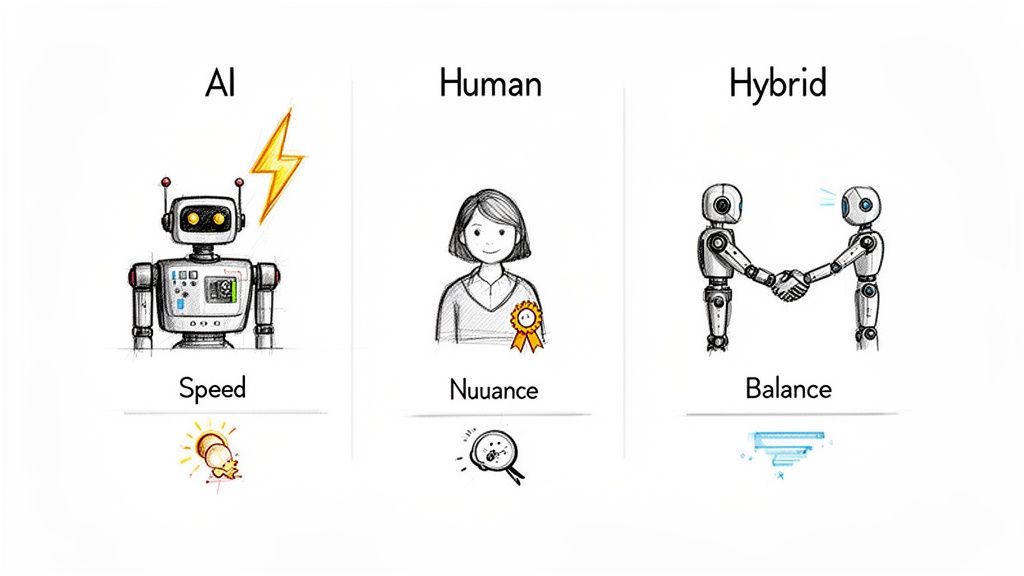
- Speed: Is the clock ticking? I've worked with startups that needed a pitch deck translated into Japanese literally overnight for an investor meeting. In that scenario, speed is everything. A high-quality AI translation that's ready in minutes is the only viable choice.
- Budget: Watching your spending? A non-profit translating informational flyers for a local event needs a solution that's easy on the wallet but still gets the message across clearly. Knowing your budget from the start lets you focus on smart options, like AI-first workflows. You can get a better sense of the numbers by looking into the typical document translation cost for different methods.
- Accuracy: Is there absolutely no room for error? This is non-negotiable for things like medical records or legally binding contracts. When precision is everything, you'll likely need a hybrid approach where a powerful AI gives you a solid first draft that a human expert then verifies and perfects.
Getting this choice right is a big deal in today's global market. The machine translation industry was valued at over $1.1 billion back in 2022 and is on track to hit $3 billion by 2027. This growth is fueled by AI tools that can slash costs by up to 90%, a staggering figure you can read more about in research from Cognitive Market Research.
What's the Point of the Document, Anyway?
Finally, what's the end game here? What do you want the person reading this to do when they're done? A marketing brochure is trying to sell something. A technical manual is trying to teach something. A legal document is trying to create a binding agreement. Each one requires a different touch.
For example, if you're translating a user manual for new software, you need absolute technical precision and consistent terms. The goal is simple: help the user succeed without confusion.
But if you're translating your website's homepage, it's a completely different ballgame. You need to capture cultural nuances and use creative, persuasive language that really connects with a new audience on an emotional level.
By answering these questions—who's my audience, what's my top priority, and what's the document's real purpose?—you're essentially creating a project roadmap. This little bit of prep work ensures you choose the smartest, most efficient translation path from the get-go.
Preparing Your Document for a Flawless Translation
There's an old saying in this field: "garbage in, garbage out." It’s the absolute truth when it comes to translation. If you want a great result, the single best thing you can do is start with a clean, well-prepared source file. Think of it as prepping a room before you paint—it just makes the final job go so much smoother.
Modern AI tools are incredibly smart, but they still need clear instructions. When you fix common issues in your source document first, you're removing any potential confusion. This lets the translation engine focus purely on converting the language accurately while keeping your layout intact. It’s a small bit of housekeeping that pays off in a big way.
Clean Up the Simple Stuff First
Before you even think about uploading your document, take five minutes for a quick digital cleanup. This step gets rid of hidden data and formatting quirks that can trip up the translation process and cause some truly strange errors in the final file.
Here are the most common culprits I see:
- Tracked Changes and Comments: Make sure you accept or reject all tracked changes and delete every last comment. They contain metadata and alternative text that can really confuse a translation algorithm.
- Inconsistent Formatting: Give your document a quick scan for inconsistent font sizes, random bolding, or mixed heading styles. Applying a consistent style sheet helps the AI correctly map out and replicate your document’s structure.
- Text Within Images: AI can't read text that's embedded directly into an image. If you can, it's always best to recreate these graphics with editable text layers. If not, provide the text separately. This is a huge issue with PDFs in particular. For a deeper dive, our guide on how to translate a PDF has some great strategies for this.
Simplify for Clarity and Precision
Beyond just tidying up, simplifying your content can radically improve the final translation. Complicated sentences and dense paragraphs are hard enough to read in one language, let alone two. This isn't about "dumbing down" your message; it's about making it more powerful and effective.
For instance, that long, rambling sentence with three different clauses? Break it into two or three shorter, more direct sentences. This gives the AI cleaner, more distinct ideas to work with, which almost always produces a more natural-sounding translation.
The goal is to remove any ambiguity from the source text. Every confusing phrase or overly complex table you simplify in the original document is one less potential error in the translated version.
One of the trickiest things we run into are scanned documents, which are basically just images of text. These require a specialized approach. If that's what you're dealing with, an expert guide on how to translate scanned PDF files offers specific methods to make sure the text is machine-readable before you start. Getting that foundational step right is absolutely critical for non-editable files.
Choosing Your Translation Engine: AI, Human, or Hybrid?
This is the big decision, the one that shapes your entire translation project. Finding the best way to translate a document isn’t about a single "correct" answer; it's about making the smartest choice for your specific situation. Let’s walk through the options with some real-world examples to make it easy.
Pure AI: When Speed and Volume Are Everything
Think of AI-powered machine translation (MT) as your engine for raw power and efficiency. It’s the go-to for projects where getting it done fast is the top priority.
We're talking about translating a 300-page technical manual where consistent terminology matters more than creative flair, or processing huge batches of internal knowledge base articles. The biggest win here is getting a document back in minutes—with all its formatting perfectly intact—instead of waiting weeks. Modern AI tools are fantastic at preserving complex layouts, so you don't have to spend hours rebuilding tables, charts, and styles.
When is AI the clear winner?
- Internal Communications: You need to get company-wide memos, HR policies, or training materials into another language so everyone is on the same page. The goal is clear information transfer, not a marketing masterpiece.
- Massive Projects: You're facing a mountain of text, like technical documentation or a library of customer support articles. Human translation would simply be too slow and expensive.
- Quick Gist & Research: You just need to understand what a foreign-language report, article, or competitor's website is saying without needing a polished, publication-ready final product.
The Human Touch: For High-Stakes Content
Professional human translation brings something to the table that AI, for all its power, just can't match: a deep understanding of cultural nuance and creativity. For your most important content, this human element is absolutely essential.
This is the only real choice for marketing copy, literary works, or any document where you need to create an emotional connection or preserve a specific brand voice. A human translator gets the idioms, understands the cultural sensitivities, and knows how to craft persuasive language. They don't just swap out words; they adapt your core message so it truly resonates with a new audience—a process we often call transcreation.
The old, purely manual approach is quickly becoming a thing of the past. The machine translation market hit $650 million in 2020 and is on track to hit $3 billion by 2027. During the COVID crisis alone, demand in the healthcare sector shot up by 49%, proving the need for fast, reliable solutions. You can dive deeper into these numbers in this translation services market report.
The Sweet Spot: A Smart Hybrid Model
For many projects, a hybrid model offers the best of both worlds. The process is simple: AI produces a high-quality first draft, and then a human expert steps in to refine, polish, and perfect it. This approach dramatically cuts down on the time and cost compared to a fully human workflow, but you still get superior accuracy and nuance.
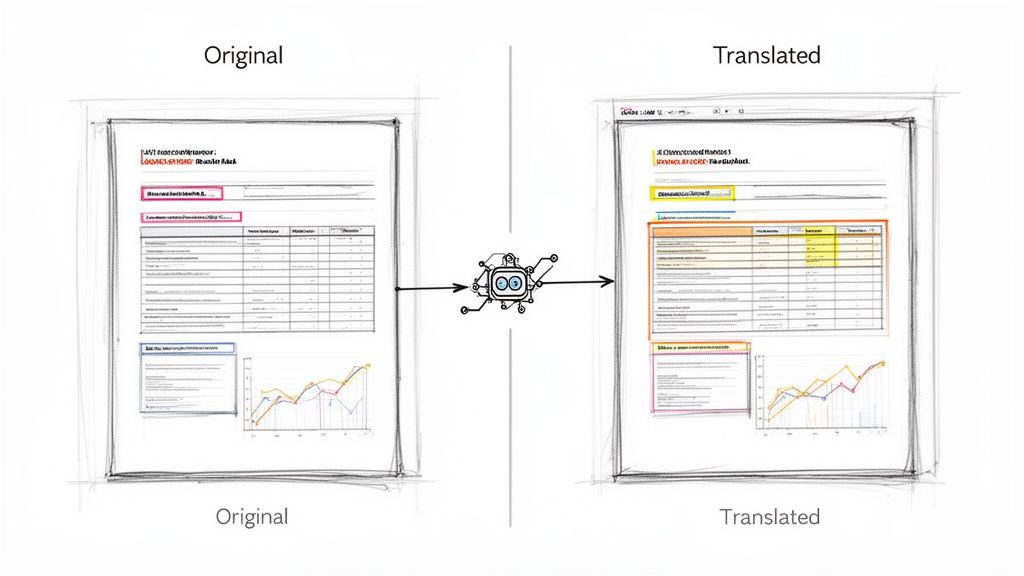
This image really captures the idea of simplifying the workflow—taking a complex source file and turning it into a clean, ready-to-use translated document.

This is the core value: AI does the heavy lifting on the initial translation and formatting, which frees up human experts to focus on what they do best—quality control and refinement.
Let's say you're launching a new website landing page. AI can translate all the content in a flash, but you'll want a human marketer to review it to make sure the headline is just as catchy and the call-to-action is just as compelling in the new language.
For highly specialized content like legal contracts or medical records, you need an ironclad guarantee of accuracy. In those cases, you’ll want to look into services that offer certified document translation, which almost always uses a rigorous, expert-led hybrid model.
Don't Skip the Final Polish: A Post-Translation Quality Check
Your document is back from translation. It's tempting to fire it off immediately, but hold on. The final quality assurance (QA) pass is what separates an acceptable translation from a truly professional one. This is your last chance to catch those subtle issues—the kind that automated tools often miss—and ensure your message lands perfectly.
This isn't about re-translating the whole thing. It's a smart, targeted review focused on the areas where things most often go wrong. You're hunting for consistency, making sure the formatting held up, and confirming that the language flows naturally for a native speaker.
It's a step that pays dividends. The global market for language services is ballooning, expected to grow from $76.24 billion in 2025 to over $127.53 billion by 2032. In this massive market, quality is everything. Traditional translation methods often break document formatting, leading to hours of frustrating and expensive rework. Modern AI-powered workflows can slash this wasted effort by up to 90%, in large part by making these final checks faster and more reliable.
A Practical Quality Checklist
To keep your review quick but effective, you need a game plan. Zero in on these key areas to catch the most common slip-ups without getting lost in the weeds.
- Consistent Terminology: Does "user account" appear the same way in the introduction as it does in the conclusion? Inconsistent key terms, especially in technical manuals or legal contracts, can create serious confusion for the reader.
- Solid Formatting: Just give it a quick visual scan. Did the tables survive the journey? Are all the bullet points and numbered lists intact? Make sure headers, footers, and page numbers haven't gone rogue. This is where many projects stumble, and why a format-preserving tool is so valuable.
- Natural Language Flow: Pick a few paragraphs at random and read them out loud. Does it sound like something a native speaker would actually say? AI is getting incredibly good, but it can still produce sentences that are technically correct but feel clunky or unnatural.
Keep Your Brand Voice Consistent with a Simple Glossary
For any business, protecting your brand's unique language is crucial. You don't need a fancy, expensive system to manage this. The best way to get consistent results is to build a simple glossary.
Just create a basic two-column spreadsheet. In the first column, list your company's key terms—product names, taglines, internal jargon. In the second, put their official, approved translations. Before you sign off on any project, use the "find" feature (Ctrl+F or Cmd+F) to spot-check these critical terms.
This tiny bit of prep work ensures your brand voice remains strong and consistent across all languages. It's a fundamental part of a robust quality process. To dive deeper into refining your review skills, check out these excellent proofreading techniques for transcripts, as many of the same principles apply. This final review is what gives you the confidence to know the job is truly done right.
Common Document Translation Questions Answered
When you're diving into document translation, a lot of practical questions pop up. You need to be sure you're making the right call, especially when dealing with complex files or sensitive information.
Let's walk through some of the most common concerns I hear and get you some clear, direct answers. Think of this as your go-to guide for handling the details like a pro.
Is It Safe to Upload Sensitive Documents?
This is probably the biggest question on everyone's mind, and the answer is: it all comes down to the service you choose.
Let’s be direct. Free, public-facing online translators are a massive security risk. Many of these platforms use your data to train their AI models, which means your confidential information could end up exposed. They have to make money somehow, and often, your data is the product.
Professional-grade translation services, however, are built on a foundation of security. When you’re handling things like legal contracts, financial reports, or private medical records, you absolutely must use a service that takes security seriously.
Here’s what to look for—consider these non-negotiable:
- End-to-end encryption that protects your files while they're being uploaded, processed, and downloaded.
- A crystal-clear privacy policy that explicitly states your documents are never shared or used for AI training.
- Automatic file deletion after a certain period. Your data shouldn't be sitting on a server forever.
Without these safeguards, you're playing with fire. Choosing a secure platform isn't just a feature; it's a fundamental part of a sound translation workflow.
How to Translate Large Files Like Manuals or Books
Ever tried uploading a 200-page manuscript or a dense technical manual to a basic online translator? It usually ends in a crashed browser or a half-finished job. Most free tools just aren't built to handle that kind of volume and have strict limits on file size and page count.
The professional solution is a technology called intelligent chunking. This isn't something you have to do manually; the software handles it behind the scenes. It automatically breaks your huge document into smaller, manageable segments for translation. Once each piece is done, the system stitches them back together perfectly, preserving the original order and structure.
This approach effectively eliminates page limits, giving you a reliable way to translate massive documents without the usual headaches. It's the standard for everything from lengthy reports to entire books.
Beyond just handling the size, this technology ensures consistency. Critical terms and phrases are translated the same way from page 1 to page 200, which is essential for long-form content.
The Best File Format for Translation
So, what’s better: DOCX or PDF? The good news is that with the right tool, it doesn’t really matter.
A DOCX file is usually simpler for translation software to parse because its underlying structure is cleaner. If you have the original Word document, it’s a fantastic place to start.
But let's be realistic—we often only have the final PDF. In the past, this was a nightmare. You’d try converting the PDF to Word, and the formatting would just explode. Thankfully, modern AI translation services are now designed to work directly with the complexities of PDFs. They can read and replicate intricate layouts, including tables, images, and text boxes, without you needing to do any messy conversion work first.
The takeaway is simple:
- Have the DOCX? Great, use it for the cleanest possible input.
- Only have a PDF? No problem. A format-preserving AI service will handle it just fine.
Ensuring Brand Terms Are Translated Correctly
Nothing undermines a professional translation faster than inconsistency. You need to make sure your company name, product features, and key taglines are translated the same way, every single time.
A surprisingly effective and simple method is to do a "find and replace" check during your final quality review. Before you even start, create a basic two-column list of your key brand terms alongside their officially approved translations. After the AI has done its job, just use the search function in your document editor to spot-check those specific terms.
This small step is a low-effort, high-impact way to keep your brand voice consistent across languages without needing complex, enterprise-level terminology management software.
Ready to experience a smarter, faster, and more secure way to translate your documents while keeping your formatting perfectly intact? DocuGlot uses top-tier AI to deliver ready-to-use translations in minutes. Try DocuGlot today and see the difference for yourself.
Tags
Ready to translate your documents?
DocuGlot uses advanced AI to translate your documents while preserving formatting perfectly.
Start Translating