Mastering PDF Document Translation A Complete Guide
Translating a PDF isn't just about swapping words from one language to another. It's the intricate process of converting all the text inside a PDF file while fighting to keep the original layout and design perfectly intact. Unlike a simple text document, a PDF’s fixed format makes this a surprisingly tough job, and it almost always requires specialized software to get it right without turning your beautiful document into a jumbled mess.
The Real Challenge of Translating PDF Files
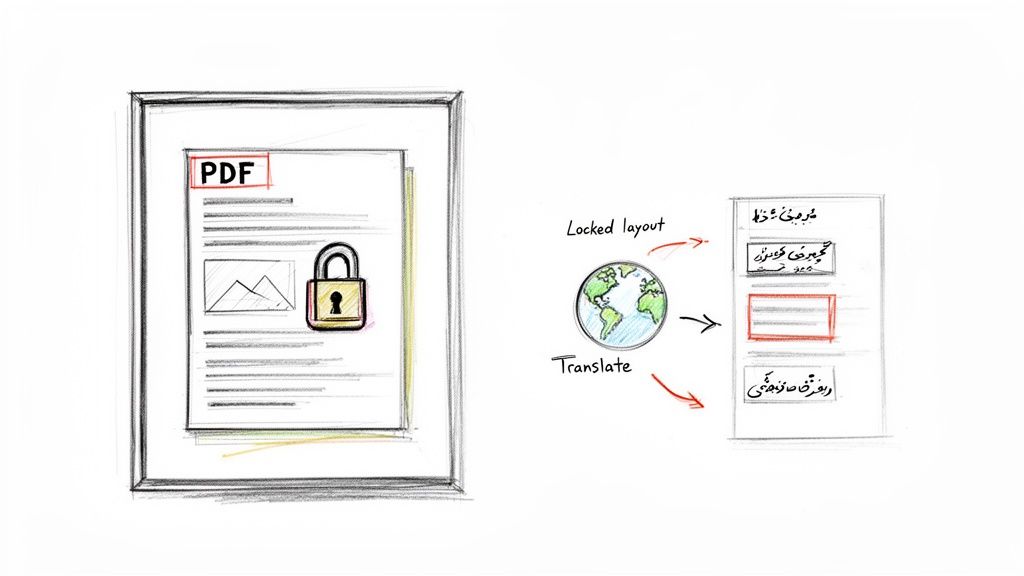
Think of a Microsoft Word file like a box of LEGOs. You can easily add more bricks (text), swap out colors (fonts), and rebuild entire sections (paragraphs) on the fly. The document just flows and adapts to whatever you do.
A PDF, on the other hand, is like a fully assembled and glued LEGO model. Every single piece—text, images, charts, and even the empty space—is locked into a specific, immovable position. Now, imagine trying to replace the English text with German, which often uses longer words. It’s like trying to force a bigger LEGO brick into a space where it just won’t fit. You’ll inevitably break the structure, smudge the design, and ruin the whole look.
This is the central headache of PDF document translation. The real work isn't just translating the text; it's about carefully taking apart a static file, translating its contents, and then painstakingly putting it all back together in a new language without losing its original visual appeal.
Why PDF Translation Is a Growing Business Need
As business goes global, the demand for high-quality document translation has skyrocketed. Companies are constantly sharing marketing brochures, technical manuals, legal contracts, and financial reports with partners and customers around the world. This trend is fueling a document translation services market valued at a massive USD 40 billion in 2023, with projections showing it could reach USD 70 billion by 2030.
The tricky nature of the PDF format is a common bottleneck for businesses. For instance, tasks like extracting data from PDF pitch decks automatically are already complex because of the file's rigid structure. That same rigidity is exactly what makes translation so difficult without the right approach.
The heart of the problem is that PDFs were never built to be edited. They were designed for viewing—to ensure a document looks the exact same on any screen, anywhere. Essentially, it’s a 'digital printout' that actively resists being changed.
Common Obstacles in PDF Translation
When translating PDFs, you quickly run into a few common roadblocks that can seriously undermine the quality and readability of your final document. These issues are far more complex than just replacing words.
Before diving into the solutions, it's helpful to understand exactly what you're up against. The table below breaks down the most frequent challenges people face.
Key Challenges in PDF Translation
| Challenge | Description | Common Outcome |
|---|---|---|
| Text Expansion & Contraction | Languages take up different amounts of space. German can be 30% longer than English, while others might be shorter. | Text overflows its container, overlaps with other elements, or leaves big, ugly gaps in the layout. |
| Broken Layouts | Simple translation methods can’t handle complex formatting like tables, columns, headers, or footers. | The document’s structure falls apart, resulting in a messy, unprofessional, and often unreadable file. |
| Non-Editable Text (Scans) | Scanned PDFs are just images of text, not actual text characters. The content isn't selectable or editable. | The text can't be translated at all until you run Optical Character Recognition (OCR) on it first. |
These obstacles highlight why a simple copy-and-paste job just doesn't work for PDFs. Let's look at each one more closely.
- Text Expansion and Contraction: It's a simple fact: languages have different rhythms. A short, punchy English phrase can become a much longer sentence in German, which is notorious for being up to 30% longer. On the flip side, languages like Japanese might express the same idea more concisely. This mismatch wreaks havoc on a fixed layout, causing text to spill out of text boxes or leave awkward white space.
- Broken Layouts and Formatting: This is where most DIY translation attempts fail. A simple tool might translate the words, but it almost always destroys the sophisticated formatting. Tables get scrambled, columns misalign, and headers and footers get pushed out of place, making the document look sloppy and untrustworthy.
- Non-Selectable Text (Scanned PDFs): What if your PDF is actually a scan of a paper document? In that case, the file doesn't contain text—it contains a picture of text. You can't copy, edit, or translate it directly. You first need a technology called Optical Character Recognition (OCR) to scan the image and convert it into actual, editable text. This adds another step and introduces another chance for errors.
AI vs. Human Translation: Which Method is Right for You?
Choosing how to translate your PDF documents can feel like picking a vehicle for a cross-country trip. Do you take the supersonic jet for pure speed, or the luxury touring car for a precise, comfortable, and tailored journey? Each has its place. Let's break down the two main approaches—AI-powered translation and professional human translation—to see which one fits your project.
AI translation is the supersonic jet. It uses sophisticated neural networks to process huge amounts of text in a flash, often for a fraction of what traditional methods cost. Imagine an incredibly smart assistant that can translate an entire library of technical manuals before a person could even finish the first chapter.
This combination of speed and affordability has made AI a game-changer. In fact, machine and neural translation technologies are on track to make up 61.25% of all translation service revenue by 2025. Businesses are jumping on board because they can cut costs by up to 80% and get their translations 10 times faster. If you want to dig deeper into the numbers, you can explore more insights on the translation services market.
The Rise of Intelligent AI Translators
Today’s AI is a world away from the clumsy, literal translators of the past. Early machine translation was notorious for spitting out word-for-word nonsense that completely missed the point. Modern AI models are far more sophisticated. They can grasp idioms, maintain a consistent tone, and even handle complex technical jargon with surprising accuracy.
For PDF translation, the real breakthrough is in layout preservation. Advanced AI tools don't just see a wall of text; they understand the document's architecture. They identify headers, tables, images, and columns, translate the text inside them, and then intelligently reassemble the document to fit the new language.
AI truly shines on projects where speed, scale, and consistency are the top priorities. It’s perfect for translating large batches of internal documents, technical manuals, or knowledge bases where the goal is to get accurate information out the door quickly.
But for all its power, AI still has its limits. It can stumble over the subtleties of human communication—the clever wordplay in a marketing slogan, the cultural sensitivities embedded in a legal contract, or the persuasive tone of a sales pitch. And that's where human expertise remains absolutely essential.
The Irreplaceable Value of Human Translators
Think of human translation as the luxury touring car. It’s a more deliberate and meticulous journey, designed to deliver a flawless, culturally-attuned result. A professional human translator isn't just someone who speaks two languages; they are bicultural experts. They live and breathe the nuance, context, and creative flair needed to make a translation truly connect with its intended audience.
A human translator brings a level of finesse that AI just can't replicate yet. They can:
- Capture Cultural Nuances: They know that a friendly phrase in one culture could be confusing or even offensive in another.
- Adapt Creative Content: Translating marketing copy or brand slogans isn't just about words; it's about preserving the original intent and emotional impact, which requires real creativity.
- Ensure Legal and Medical Precision: In high-stakes fields, a human expert provides a critical safeguard, guaranteeing that every single term is translated with absolute accuracy to avoid serious risks.
This white-glove service, of course, comes at a higher price in both time and money. A professional might take days or weeks to translate a large document, and the rates are significantly higher. This makes it a tough fit for projects with tight deadlines or smaller budgets. For a deeper dive into the options, feel free to check out our guide on document translation services.
Deciding between the two can be tough, so here’s a quick rundown to help you compare.
AI vs Human Translation: A Head-to-Head Comparison
| Feature | AI Translation | Human Translation | Best For |
|---|---|---|---|
| Speed | Nearly instantaneous; thousands of words per minute. | Slower; typically 2,000-3,000 words per day. | Urgent projects, large-volume internal content. |
| Cost | Very low, often a few cents per word or less. | Higher, priced per word, with minimum fees. | High-value, customer-facing, or creative content. |
| Accuracy | High for technical and straightforward text. | Highest level, especially for nuanced content. | Legal contracts, medical documents, marketing campaigns. |
| Nuance & Culture | Can miss subtle context, idioms, and cultural tone. | Excellent at adapting content to be culturally appropriate. | Branding, literature, and persuasive communication. |
| Consistency | Perfect consistency across massive volumes of text. | Can vary slightly between translators. | Technical manuals, knowledge bases, user guides. |
| Layout Preservation | Advanced tools can preserve complex layouts automatically. | A manual, time-consuming desktop publishing (DTP) process. | Visually rich documents like brochures and reports. |
While the table shows two distinct paths, the reality is that you don't always have to choose just one.
Finding the Best of Both Worlds: A Hybrid Approach
For many businesses, the smartest choice isn't AI or human, but a powerful combination of both. This hybrid model, known in the industry as Post-Editing Machine Translation (PEMT), uses AI for the initial heavy lifting, followed by a human expert who reviews and perfects the output. It’s a "best of both worlds" strategy.
Here’s a look at how it works:
- AI First Draft: An advanced AI tool translates the entire PDF, keeping the original layout intact.
- Human Review: A professional translator then reviews the AI's work.
- Refinement: The translator polishes the text, correcting any awkward phrasing, fixing errors, and ensuring it’s culturally spot-on.
This balanced approach gives you a high-quality, perfectly formatted translation much faster and more affordably than a 100% human process. It lets you tackle large-scale PDF projects efficiently without giving up that crucial, final touch of human expertise.
How to Keep Your Document Layout Intact
Translating a PDF can often feel like solving a puzzle where the pieces just won't fit. The real challenge isn't just swapping out words; it's making sure the final document looks every bit as professional as the original. This is exactly where most basic translation methods fall flat, leaving you with a document that’s a complete structural mess.
This problem boils down to a simple but powerful linguistic reality: text expansion. When you translate text, its length almost always changes. For instance, translating from English to German can increase the sentence length by up to 30%.
Think of your document's design as a perfectly engineered car frame. The original English text is the engine that fits snugly inside. Now, imagine trying to swap it with a new, larger German engine. A simple translation tool will just try to cram that bigger engine into the same small space. The result? Bent frames, broken connections, and a total design breakdown. That's what happens to your layout.
This is the core problem that separates basic translation from a professional-grade solution.
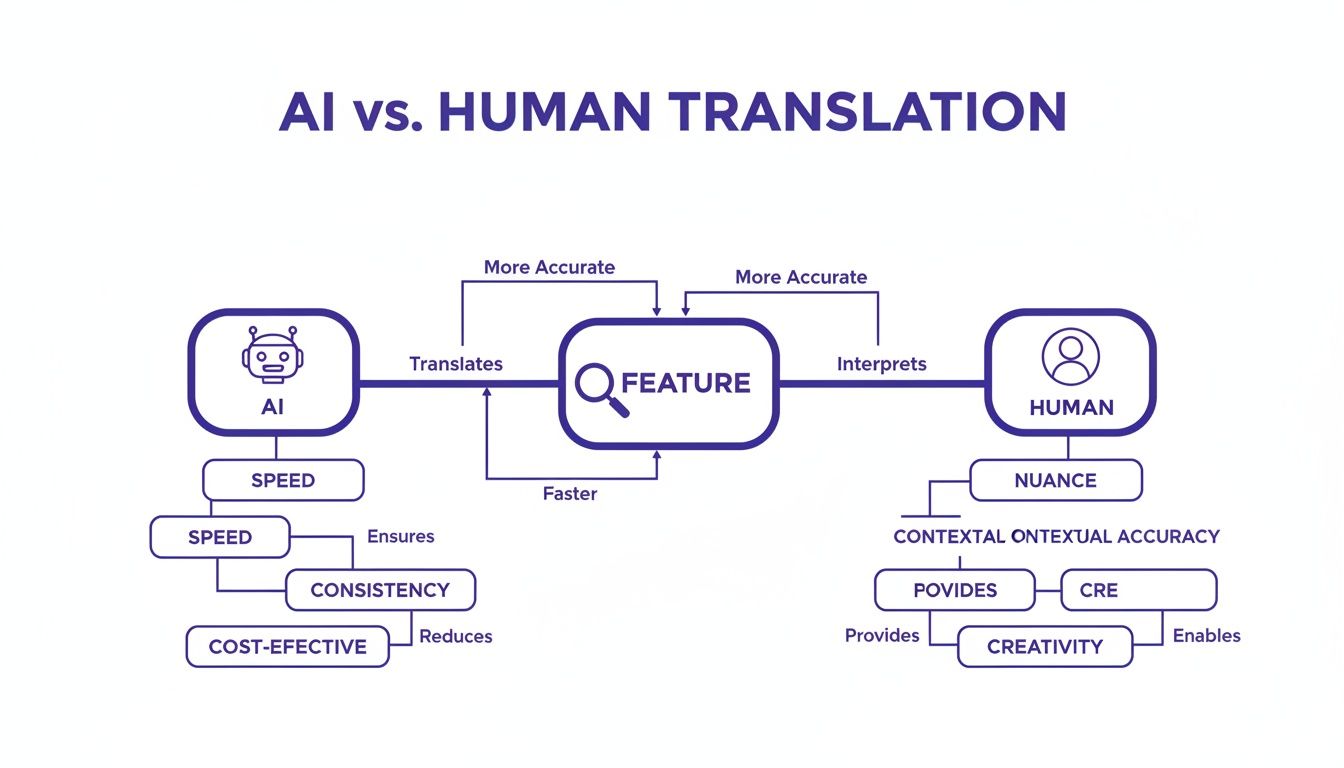
As you can see, while human translators are unmatched for nuance, advanced AI is specifically built to handle the technical headache of preserving a document's structure, especially at scale.
The Complexity of Visual Elements
Text expansion is just one piece of the puzzle. Professional documents are full of visual elements that add another layer of difficulty to the pdf document translation process.
- Tables and Charts: These have rigid cells and precise spacing. Even a small change in text length can cause words to overflow, push columns out of alignment, or break the entire table.
- Headers, Footers, and Page Numbers: These elements need to stay put on every single page. That becomes a huge challenge when the translated content reflows and changes the document's pagination.
- Right-to-Left Languages: Languages like Arabic or Hebrew don't just expand differently; they flip the entire reading direction. This requires a complete overhaul of the layout, not just a simple text replacement.
Trying to fix these issues by hand after a basic text translation is incredibly time-consuming. It often requires you to be a pro with desktop publishing (DTP) software and can turn a quick job into a week-long design project. For a deeper dive into this process, check out our guide on how to translate a PDF.
How Modern AI Solves the Layout Puzzle
Fortunately, modern AI-powered translation services are designed to solve this exact problem. These platforms don't just see a string of words. They analyze the document’s entire structure—the columns, tables, images, and text boxes—as a set of interconnected components.
An advanced AI translation engine acts like both a skilled linguist and a master architect. It first understands the meaning of the words, then reconstructs the document’s blueprint to accommodate the new language perfectly.
This whole process involves a few smart steps:
- Structural Analysis: The AI starts by deconstructing the PDF, identifying every single layout element and how it relates to everything else.
- Contextual Translation: Next, it translates the text, paying close attention to the surrounding context to ensure accuracy.
- Intelligent Reconstruction: This is the magic step. The AI rebuilds the document in the new language, automatically adjusting font sizes, line spacing, and column widths. It makes the new text fit perfectly while keeping the original design intact.
Thinking about visual integrity in documents has parallels in other areas. For example, the challenge of converting PDF to video also requires technology that can interpret and reconstruct a document's visual structure.
By using an AI service built for layout preservation, you get to skip the manual, frustrating process of fixing broken formatting. You end up with a professionally translated PDF that looks and feels just like the original, ready to go without any extra design work.
Ensuring Secure and Complant Document Translation
When you’re dealing with sensitive documents—think legal contracts, patient records, or proprietary research—the security of your pdf document translation service isn't just a nice-to-have. It’s the bedrock of the entire process.
Relying on a free, unsecured online tool is a bit like mailing a confidential letter in a see-through envelope. You're practically inviting data breaches, unauthorized access, and a complete breakdown of confidentiality. The risks are very real, as many free services might hold onto your data indefinitely or even use it to train their AI models, creating a massive privacy blind spot.
Core Security Measures to Look For
A professional-grade translation service should treat your data with the same respect you do. This means implementing serious security protocols that safeguard your documents from start to finish. Picture it like a digital armored car, protecting your information from the moment you upload it until you download the final translation.
Here’s what you should demand from any platform you use:
- End-to-End Encryption: Your files need to be encrypted both in transit (while uploading/downloading) and at rest (when stored on servers). This makes the data completely unreadable even if a breach somehow occurs.
- Secure Data Handling: The provider must have a rock-solid policy against sharing your documents with anyone. Your data belongs to you, and it should never be used for anything else.
- Automatic File Deletion: To limit exposure, look for services that automatically and permanently delete your files from their servers after a short window, like 24 hours.
These features are the bare minimum for creating a secure environment where you can translate documents without worrying about who might be looking over your shoulder.
Navigating Industry Compliance Standards
Beyond general security, many fields are bound by strict data protection laws. A single violation can trigger severe legal and financial consequences, making compliance a deal-breaker when choosing a translation partner.
For instance, healthcare organizations are required to follow the Health Insurance Portability and Accountability Act (HIPAA) to protect patient data. Likewise, any company that handles information from EU citizens has to comply with the General Data Protection Regulation (GDPR).
Adhering to standards like HIPAA and GDPR isn't just about avoiding fines; it's about demonstrating a commitment to ethical data stewardship and building trust with your clients, patients, or partners.
The stakes get even higher in specialized areas. Take legal translation, which now accounts for 23.3% of the entire translation services market and is growing at an 8.1% annual clip—the fastest of any category. This boom is fueled by the non-negotiable need for accuracy and confidentiality in legal matters. You can discover more insights on high-stakes translation trends to get a better sense of the industry.
And when documents need to hold up in court or for official purposes, human verification often comes into play. It's worth taking the time to understand the role of certified translation services and when they are necessary. Ultimately, picking a service that is both secure and compliance-aware is the only way to manage risk effectively and ensure your translations meet all professional and legal standards.
A Practical Workflow for Flawless PDF Translation
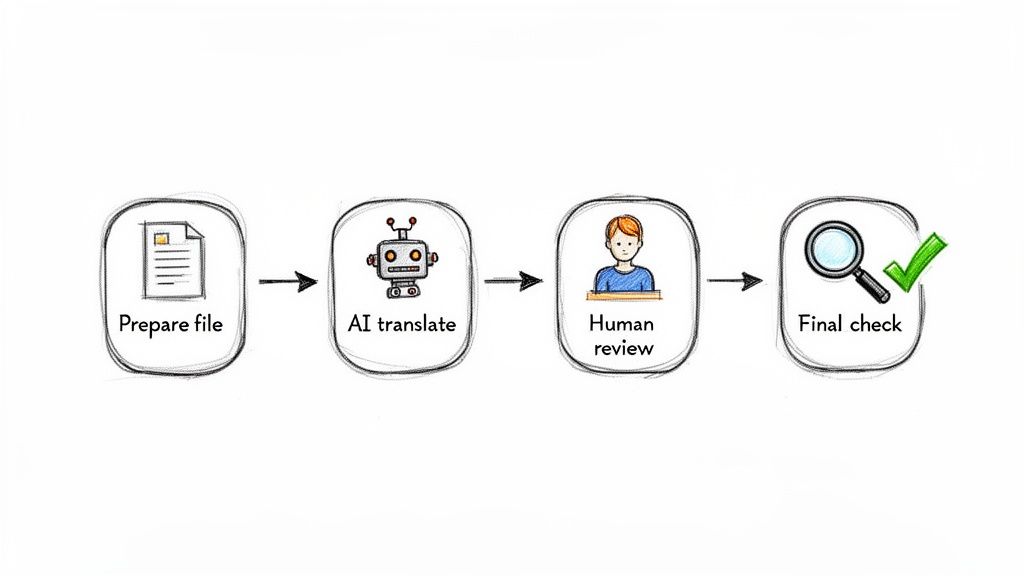
Getting a high-quality PDF translation isn't magic; it’s about having a solid, repeatable process. Just like an architect needs a blueprint before laying a single brick, you need a clear workflow to turn a source file into a perfectly translated and formatted document.
Breaking the project into four distinct phases—preparation, translation, review, and final checks—helps you sidestep common traps like broken formatting, contextual errors, and missed text. It's a methodical approach that ensures nothing gets left to chance.
Step 1: Prepare Your Source File
The final translation is only as good as the file you start with. Before you even think about translation, taking a few minutes to prep your source PDF can save you from major headaches down the road.
First off, always try to work with a text-based PDF. Scanned documents are just images of text, and they need Optical Character Recognition (OCR) to become editable, which can introduce frustrating errors. A clean source file with selectable text gives you the best possible foundation.
If you have any control over the source file, it also helps to simplify overly complex layouts. While modern tools are pretty good with intricate designs, things like heavily layered graphics or unusual text flows can sometimes cause hiccups. A cleaner design almost always translates more smoothly.
Step 2: Choose the Right Translation Quality
Not every document demands the same level of precision. Just as you wouldn’t use a sledgehammer to crack a nut, you don’t need the most sophisticated AI model for every single job. Knowing what you need helps you find the right balance between cost, speed, and accuracy.
Think about what the document is for:
- Internal review or a quick read: A fast, basic AI translation is usually more than enough. It gets the core message across for non-critical tasks.
- Technical manuals or business reports: This is where a premium AI model shines. It’s much better at handling specialized jargon and complex sentences.
- Marketing, legal, or medical content: For these high-stakes documents, you absolutely need human review on top of the initial AI translation. The nuance and precision required are too important to leave to a machine alone.
The key is to match the tool to the task. Choosing the right translation tier ensures you get the quality you need without overspending on documents where "good enough" is truly good enough.
This is all about being strategic. You can manage your budget effectively while still ensuring top-tier quality where it truly matters.
Step 3: Implement Human Review for Critical Documents
When accuracy is non-negotiable, a human expert is essential. AI can get you a fantastic first draft—often 95% of the way there—but a professional translator adds the final polish that guarantees perfection. This hybrid approach is the gold standard for any content that really counts.
A human reviewer, often called a post-editor, does more than just fix typos. They are bicultural experts who make sure the translation isn't just correct but also culturally appropriate and contextually sound. They catch the subtle stuff an algorithm might miss, like idioms, industry-specific lingo, or persuasive marketing language.
This step is your safety net. It mitigates risk in legal contracts, ensures patient safety in medical documents, and protects your brand’s reputation in marketing materials. Think of AI as the skilled apprentice and the human editor as the master craftsperson who gives the final sign-off.
Step 4: Perform Final Quality Checks
Once the translation and review are done, a final quality assurance (QA) check is your last line of defense. This doesn't have to be a huge undertaking; a simple checklist can help you spot any lingering issues before you hit "send."
Run through these final checks:
- Formatting Integrity: Give the document a quick scan for layout problems. Are tables aligned properly? Are headers and footers where they should be? Is any text spilling out of its box?
- Completeness Check: Put the translated document next to the original. Make sure no paragraphs, sentences, or even single words were accidentally dropped.
- Contextual Spot-Check: Read a few key sentences or paragraphs out loud. Does the meaning come across clearly and accurately? Pay special attention to headlines, captions, and any calls to action.
This final pass puts you in control of the outcome, ensuring your translated PDF is flawless and ready for its audience.
Your Top PDF Translation Questions, Answered
If you're diving into PDF translation, you've probably got a few questions. It's a common scenario, and getting the right answers upfront can save you a lot of headaches down the road. Let's walk through some of the most frequent questions we hear from people just like you.
Can I Actually Translate a Scanned PDF?
Yes, you can, but it’s not a one-step process. A scanned PDF is basically a picture of a document; the computer sees an image, not individual letters. To make it translatable, you first need to run it through Optical Character Recognition (OCR) software.
Think of OCR as a digital detective that looks at the image, recognizes the shapes of letters and words, and converts them into actual, editable text. Once that's done, the text can be translated. Just remember, the quality of your translation hinges on the quality of the scan. A fuzzy, low-resolution scan will lead to OCR mistakes, which will then create errors in the final translation.
So, How Long Does This All Take?
That's the million-dollar question, and the answer is: it depends. The time it takes to get a finished translation is based on a few key things:
- Page Count: Obviously, a 10-page memo will be done much quicker than a 300-page technical manual.
- Complexity: A straightforward business letter is a lot faster to process than a document filled with dense legal or engineering terms.
- The Method: This is the biggest variable. AI translation services can turn around documents in minutes. A traditional human translation workflow, on the other hand, often takes days or even weeks.
To put it in perspective, a powerful AI tool might translate a 50-page report in less than an hour. That same job could easily take a professional human translator two or three full days to complete. Speed is where modern AI solutions really shine.
Is AI Good Enough for Critical Legal or Medical Documents?
This is a really important one. While modern AI is incredibly accurate for most business and technical content, it's a different story for high-stakes documents. When you're dealing with legal contracts, patient records, or financial agreements, a tiny mistake isn't just an inconvenience—it can have massive legal or financial consequences.
For these critical documents, the best practice is a hybrid approach. Start with an AI tool that preserves the document's layout for a fast, highly accurate first draft. Then, bring in a certified human translator to review and perfect it. This two-step process ensures 100% accuracy and gives you the peace of mind that everything is correct and compliant.
What’s the Difference Between Translation and Localization?
People often use these terms interchangeably, but they're not the same thing.
Translation is the literal process of converting words from a source language to a target language. The primary goal is linguistic accuracy—making sure "hello" in English becomes "hola" in Spanish.
Localization, however, is a much deeper process. It’s about adapting your entire content to feel native to a specific culture. This goes way beyond words to include things like changing currency symbols (€ to $), switching date formats (DD/MM/YYYY to MM/DD/YYYY), using culturally appropriate images, and even adjusting humor and idioms. It's what makes content truly connect with a local audience.
Ready to get your documents translated without sacrificing speed, accuracy, or formatting? DocuGlot harnesses powerful AI to translate PDF, DOCX, and other files while keeping the original layout perfectly intact. Get a secure, high-quality translation in just minutes. Try DocuGlot today!
Tags
Ready to translate your documents?
DocuGlot uses advanced AI to translate your documents while preserving formatting perfectly.
Start Translating