How to Translate a Document Without Ruining the Formatting
We've all been there. You get a translated document back, and the formatting is a complete disaster. Hours of your time are suddenly wasted just trying to piece the layout back together. The secret isn't more manual work; it's using a tool specifically built to preserve your document's structure.
Modern AI services can now translate complex files like PDFs and Word documents in minutes, keeping everything from tables to headers perfectly in place. This completely sidesteps the painful, time-consuming reformatting that used to be an unavoidable part of any translation project.
Your Guide to Flawless Document Translation
If you've ever wrestled with a translation that mangled your original design, you're in the right place. This guide is all about solving that exact problem. We'll show you how to get fast, accurate results that look just as good as the original. Forget the slow, expensive methods of the past—we're diving into how new AI tools have changed the game for businesses, academics, and anyone needing a quick, reliable translation.
The demand for solid translation is exploding. In fact, the global market for document translation services is on track to hit $44.6 billion by 2025. This isn't surprising when you consider the boom in international trade. Europe alone accounts for over 40% of the market, driven by its multilingual environment and strict rules requiring official documents to be translated. This just goes to show how critical it is to have solutions that can handle complex files without a hitch.
What This Guide Covers
This article is your complete roadmap for translating a document the right way. We’ll walk through everything you need to know, from prepping your files to the final review.
You'll learn how to:
- Pick the best translation method for what you actually need.
- Get your files (PDF, DOCX, MD) ready for the smoothest possible process.
- Handle sensitive or confidential information with confidence.
- Use AI tools to shrink translation times from days down to minutes.
Think of this as your playbook for getting documents translated without the usual headaches. The goal is simple: a perfect, ready-to-use file that maintains the integrity of your original work.
For a deeper look at the tools that make this possible, you might find our post on https://docuglot.com/blog/document-translation helpful. And if your translation needs extend beyond documents to your online presence, learning how to translate a WordPress website for free is a great next step.
Choosing Your Document Translation Method
Before you even think about uploading a file, the most important decision you'll make is how you're going to get it translated. This choice sets the stage for everything that follows—from cost and turnaround time to the final quality and even the security of your information.
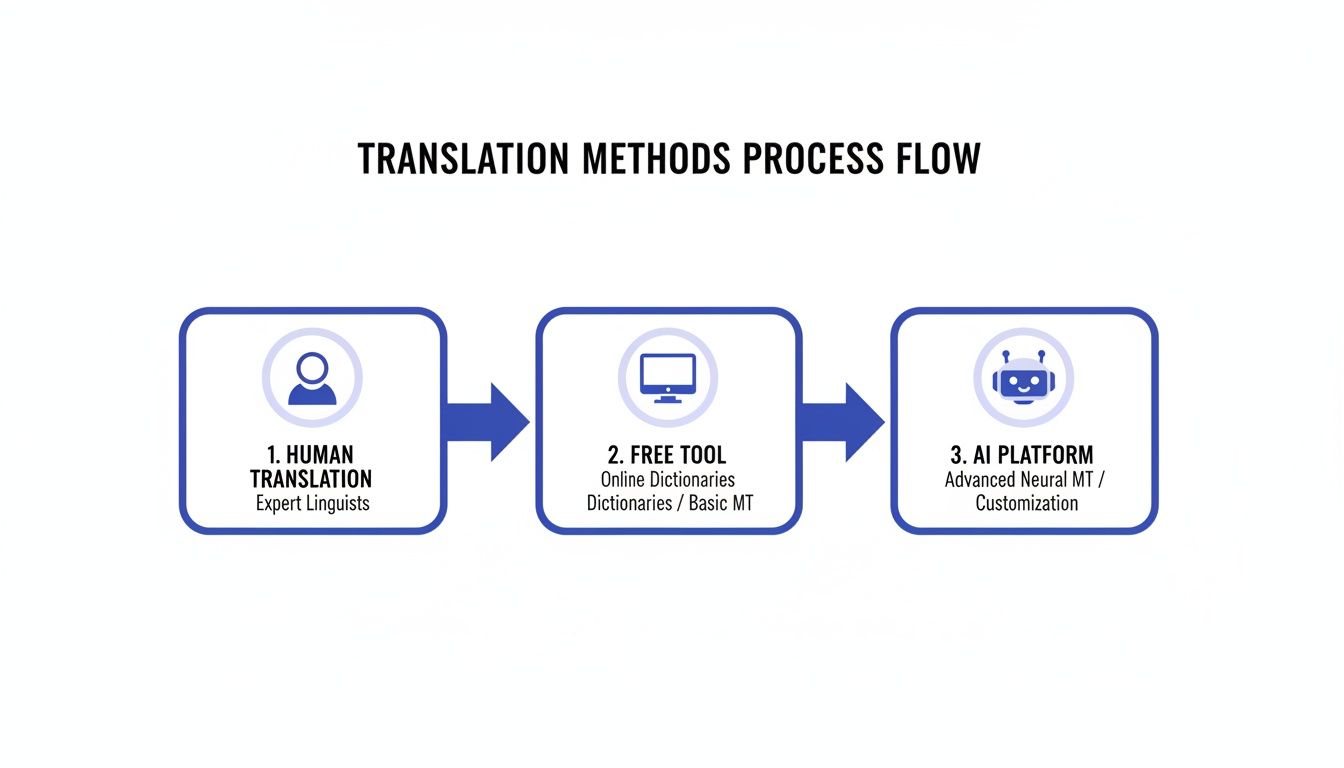
It can feel like there are a million options out there, but they really boil down to three main paths. Each has its place, and knowing the difference is what separates a smooth, successful project from a frustrating mess of broken formatting and inaccurate text.
Comparing Document Translation Methods
This table breaks down the key differences between traditional human translation, free online tools, and modern AI platforms to help you choose the right fit.
| Feature | Human Translation Agency | Free Online Tools | AI Translation Platform |
|---|---|---|---|
| Best For | Certified legal, literary, or high-stakes marketing content | Getting the gist of non-critical, internal text quickly | Business documents, reports, manuals, presentations |
| Formatting | Perfect preservation, handled manually by professionals | Almost always lost; requires complete reformatting | Excellent preservation of original layout, tables, and images |
| Speed | Slow (days to weeks) | Instantaneous | Extremely fast (minutes) |
| Cost | High (often priced per word) | Free | Affordable, subscription or pay-as-you-go models |
| Security | High (bound by NDAs and professional contracts) | Low to none; data may be used or stored | High (enterprise-grade security, data encryption) |
Choosing the right path isn't about finding the "best" one overall, but the best one for your specific document and circumstances.
Traditional Human Translation Agencies
For decades, this was the only real game in town, and for good reason. When you're dealing with a legal contract where every comma matters, or marketing copy that needs to nail cultural nuance, a professional human translator is irreplaceable. They don't just translate words; they translate meaning, context, and intent.
Of course, that level of expertise comes at a cost. This is by far the most expensive route and also the slowest. You're often looking at days, if not weeks, for a finished document. That's simply not practical for most day-to-day business needs or projects on a tight deadline.
Free Online Translation Tools
At the complete opposite end of the spectrum, you have the free online tools we've all used to look up a word or a quick phrase. They’re fast, they’re free, and for getting the general idea of an internal email, they can work just fine.
But here’s the catch: for any kind of professional document, they're a gamble. These tools are notorious for wrecking formatting, turning a neatly laid-out file into a chaotic wall of text. Even more concerning is the security risk. Uploading confidential company data to a free service with a vague privacy policy is a recipe for disaster. If your source file is a PDF, you'll first need to learn how to convert a PDF to text accurately and fast, but even that won't save your layout from being scrambled by these tools.
Modern AI Translation Platforms
This is where things get interesting. A new breed of AI-powered platform has emerged to fill the huge gap between slow, pricey agencies and risky free tools. They deliver the speed of automation with the security and formatting precision required for professional work.
The technology here has come a long way, fast. The machine translation market, which powers these platforms, shot up from $650 million in 2020 to over $1.1 billion by 2022. That kind of growth shows a real shift in how businesses are handling multilingual content.
Key Takeaway: The biggest advantage of a dedicated AI platform is its ability to understand and rebuild your document's layout. It sees the tables, headers, and columns, and it puts them back where they belong in the translated version. That alone can save you hours of painful cleanup work.
These platforms have become the go-to middle ground. They offer a powerful combination of speed, quality, and reliability that just wasn't possible a few years ago. For a deeper look, our guide on what to look for in good translation software breaks down the key features to consider.
Building Your Go-To Translation Workflow
The secret to a flawless translation isn’t magic—it’s having a solid, repeatable workflow. Think of it less like a checklist and more like a battle plan. A good process helps you sidestep common traps like mangled layouts or clunky terminology, making the whole thing predictable and surprisingly smooth.
Let's walk through a realistic workflow that I’ve seen work time and again, using a modern AI platform as our example. This approach is all about giving you control and confidence from start to finish.
Prepping Your Document: The Foundation for Success
The old saying "garbage in, garbage out" has never been more true. Before you even think about uploading a file, spending just a few minutes on prep work can save you hours of headaches later. It’s like prepping a wall before you paint—a little sanding and cleaning makes all the difference.
A few quick cleanup tasks can prevent a shocking number of errors down the line:
- Finalize all edits. A document littered with unresolved "Track Changes" will confuse any translation tool, human or AI. Accept or reject everything to create a clean slate.
- Strip out comments and notes. Internal chatter can sometimes get picked up and translated, leading to some awkward (and unprofessional) results.
- Standardize your formatting. Make sure your headings, lists, and styles are consistent. This is how the AI understands your document's structure and knows how to rebuild it properly in another language.
Kicking Off the AI Translation
With your document prepped and ready, the actual translation part is surprisingly simple with a tool like DocuGlot. The platform is built to do the heavy lifting, so you can focus on getting the details right for your specific project.
You’ll typically make three key decisions:
- Upload Your File: Modern platforms are built to handle more than just plain text. They understand the complex structures of PDFs, DOCX files, and even Markdown, preserving the original layout.
- Pick Your Languages: This is more than just "English to Spanish." You can often select regional dialects to make sure your message truly resonates with the local audience.
- Set the Quality Level: You’ll likely see options like "Basic" or "Premium." For a quick internal memo, a basic translation might be all you need. But for important, client-facing materials, a premium tier that uses a more sophisticated AI model is well worth it.
What’s happening in the background is far more than just swapping words. The AI is actually mapping out your entire document—tables, images, headers, footers—and rebuilding it from the ground up in the new language. This is what separates professional tools from simple text translators. To see how deep this goes, check out our guide on what desktop publishing (DTP) is and why it's so vital in translation.
The Final Step: Review and Polish
Once the AI has done its thing—usually in just a few minutes—you’ll get your translated file back. It’s tempting to just send it off, but don't skip this last crucial step.
Always, always do a final review. Open the downloaded document. Does the formatting look right? Do a quick scan for anything that seems out of place. This final quality check is your chance to ensure the document is truly ready for its audience, whether that's your internal team or your biggest client. A few minutes here guarantees a professional result every time.
How to Ensure Quality and Accuracy
Just because your AI-translated document is back in your hands doesn't mean the job is done. Now comes the most important part: the quality check. This final review is what separates a jumble of correctly translated words from a professional, polished document that actually works.
Don't worry, this doesn't mean you need to proofread every single line, especially for less crucial internal files. Instead, you can focus your time on a few key areas to make sure the translation hit the mark. Think of it as the final inspection before a product leaves the factory.
The Post-Translation Review Checklist
A good quality assurance (QA) process is both quick and effective. I always recommend starting with the big picture—the overall structure—before diving into the nitty-gritty of the text itself.
Word documents are the most common format we see, and in a business translation market expected to balloon from USD 58.18 billion in 2026 to USD 82.44 billion by 2035, even minor mistakes can have major consequences. If you're interested in the numbers behind this growth, you can read the full research on the translation service market.
Here’s a practical checklist I use for my own reviews:
- Check Structural Integrity: First thing's first, are the tables, columns, and headers all there and looking right? A solid AI translation tool should keep all these elements perfectly intact.
- Verify Key Terminology: Next, scan for your company’s branded terms or any industry-specific jargon. You need to confirm the AI didn't swap them out for a generic, less accurate equivalent.
- Confirm Numbers and Dates: Do a quick spot-check on a few important numbers, dates, or addresses. It’s a common place for small but costly errors to sneak in.
- Assess Cultural Nuances: This is a big one for marketing content. Is the tone right for the new audience? A phrase that’s perfectly normal in one culture can be a major misstep in another.
For example, I once saw a casual, high-energy American sales pitch get translated directly into Japanese. It came across as unprofessional and aggressive, completely missing the mark. Checking these cultural details is what elevates a translation from just "good" to truly effective.
Matching Quality to Your Needs
Let's be realistic: not every document needs the same level of polish. The real skill is matching your review effort to the document's importance. An internal team memo simply doesn't require the same microscopic review as a legally binding contract.
For your most critical documents, I highly recommend a hybrid approach. Start with a premium AI setting to handle the bulk of the work quickly and cost-effectively. Then, hand that translated file over to a professional human translator for the final polish.
This strategy gives you the best of both worlds: the raw speed of AI combined with the finesse and cultural insight of a human expert.
Navigating Security and Confidentiality
Let's be honest: uploading a sensitive document to a random website feels risky. Whether it's a confidential business plan, a critical legal contract, or private records, you need to know your information is locked down. This isn’t just a feeling—it’s about checking for real, verifiable security measures.
When you’re looking for a service to translate your documents, security can't be an afterthought. It has to be at the top of your checklist. The good news is that professional platforms are built for this, but you need to know what to look for.
Non-Negotiable Security Features
When you're vetting a translation platform, there are a few security features that are absolute deal-breakers. Think of these as the bare minimum. If a service doesn't have them, walk away.
Here’s your security checklist:
- End-to-End Encryption: Your document should be protected with SSL/TLS encryption the entire time—from the moment you hit "upload" to when you download the finished translation. This is what stops anyone from snooping on the file while it's in transit.
- Data Encryption at Rest: It's not enough for the file to be safe on its way to the server. Once it’s uploaded, it needs to be stored in an encrypted state. This means that even if someone managed to breach the server, your files would be unreadable gibberish.
- Clear Data Deletion Policies: This one is huge. A trustworthy service will tell you exactly how long they hold onto your files. Vague policies are a red flag.
A great indicator of a platform that takes security seriously is an automatic deletion policy. For instance, a service like DocuGlot automatically and permanently deletes your files from its servers after 24 hours. This drastically shrinks the window of risk.
Free Tools vs. Professional Platforms
The security difference between a free online tool and a paid, professional platform is night and day.
Free translators are often funded by ads, and their privacy policies can be alarmingly vague. Some might store, analyze, or even repurpose your data in ways you would never agree to. They simply don't have a business model that supports enterprise-level security.
On the other hand, a professional service's entire reputation is built on protecting client data. They invest heavily in security because their business depends on your trust. By choosing a platform with clear, transparent security practices, you can translate your documents with the confidence that your confidential information will stay that way.
Common Questions About Document Translation
Even with the best workflow, you're bound to run into a few questions along the way. Let's walk through some of the most common ones we hear, with practical answers to help you handle your translation projects with confidence.
How Can I Translate a PDF Without Losing the Layout?
This is probably the biggest headache people face. You've spent hours perfecting a PDF, only to have a free online tool rip the text out and spit back a jumbled mess. It’s a classic formatting nightmare.
The most reliable solution is to use an AI-powered translation service designed specifically for complex files. A professional platform doesn’t just see text; it analyzes the entire document structure—tables, images, columns, and all—and then meticulously reconstructs it in the new language.
This is the key to getting a translated PDF that looks just like the original, saving you from a mountain of manual reformatting work.
Is AI Translation Accurate Enough for Professional Use?
For a lot of business needs, absolutely. Think internal reports, initial drafts of marketing copy, or getting the gist of a competitor's research paper. Modern AI is surprisingly good and a massive time-saver.
However, when the stakes are high—think legal contracts, patient-facing medical instructions, or high-profile marketing campaigns—you need to bring in a human expert.
Our Go-To Strategy: Use a high-quality AI service like DocuGlot for the initial heavy lifting. It's fast and cost-effective. Then, have a native-speaking human reviewer give it a final polish to catch any cultural nuances or subtle phrasing that the AI might have missed. This hybrid approach gives you the best of both worlds: machine speed and human finesse.
How Long Does It Take to Translate a Large Document?
This is where AI really changes the game. A human translator, even a great one, might need a week or more to get through a 200-page technical manual. It's a ton of work.
An AI platform? It can process that same document in just a few minutes.
You simply upload the file, and the service emails you a link when the translated version is ready to download. What used to be a week-long project can now be finished before you've even finished your coffee.
What Is the Most Secure Way to Translate a Confidential Document?
First rule: never, ever upload sensitive information to a free, public translation website. Their privacy policies can be murky at best, and you have no real guarantee your data is being protected.
Instead, always opt for a professional translation platform that puts security front and center. Look for these two non-negotiable features:
- End-to-end data encryption: This protects your file from the moment you upload it until you download the translation.
- Automatic file deletion: The service should have a clear policy stating that your files are permanently deleted from their servers after a set period, like 24 hours.
These measures are critical for ensuring your confidential information stays that way.
Ready to translate your documents with speed, accuracy, and perfect formatting? DocuGlot uses advanced AI to preserve your layout, handling everything from PDFs to DOCX files in minutes. Get your project done right the first time.
Tags
Ready to translate your documents?
DocuGlot uses advanced AI to translate your documents while preserving formatting perfectly.
Start Translating